
Setting goals
Goals turn the dashboard from a rear-view mirror into a plan. Set targets on the KPIs that matter and track how far ahead or behind you're running.
Setting goals
The Overview Page is also where you'll create goals to track progress over time.
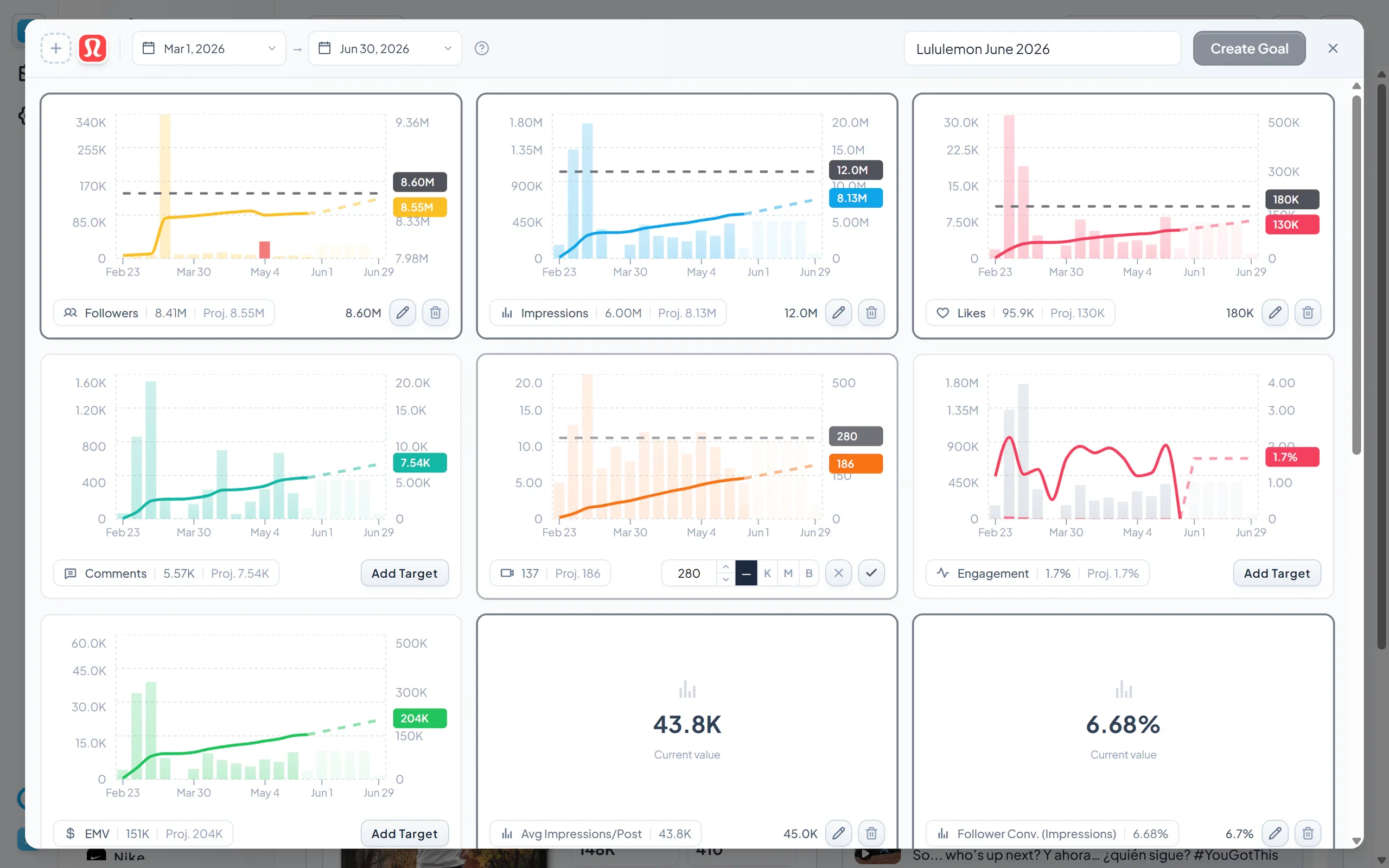
To create a goal
- Click Create Goal next to the filter bar at the top of the page. (If you already have an account filtered, click the three dots next to that filter and select Goal.)
- In the goal pop-up, select the brand, account, or campaign the goal applies to in the top left.
- Select the date range for the goal next to it.
- Scroll through the KPIs and click Add Target on the metrics you want to track.
How projections work
When you add a target, Socialpruf forecasts performance using the past 3 months of real data. This will show as a linear projection up until the end date of the goal.
Setting your target
For each KPI, you can either:
- Type a specific number you want to hit, or
- Drag the target line up or down on the graph until it lands where you want.
When you're done, click the check mark on each KPI to confirm, name your goal in the top right, and click Create Goal.
Tracking goal progress
Once your goal is live, filter by it on the Overview Page. Each KPI card will now show your pacing: how far ahead or behind you are relative to where you need to be to hit the goal on time.
- Toggle between percentage and whole number views to see progress two ways.
- Click any KPI card to see your progress against the overall goal target.