Many social statistics are hidden behind the creator's login and platform APIs are becoming less generous every day. Instead, we'll look at what's publicly visible on Instagram and TikTok, four ways to collect that data, what remains behind the login, and why most dedicated platforms still require authorization.
You can ask everyone for a media kit, but then your decisions start to depend on what they choose to send. Public data gives you a more consistent place to start. You can look at every creator on the list at the same time, without asking anyone to connect an account, and learn more than you might expect. Here are four ways to collect that data, what you can see, and what genuinely stays behind the login.
What you can see without authorization, and what you can't
| Metric | Instagram, publicly visible | TikTok, publicly visible | Needs the creator's authorization |
|---|---|---|---|
| Follower count | Yes | Yes | No |
| Likes and comments per post | Yes | Yes | No |
| Views | Yes | Yes | No |
| Stories | Yes | Yes | No |
| Organic vs boosted | Yes | Yes | No |
| Shares | Yes | Yes | No |
| Saves / bookmarks | No | Yes | Yes, on Instagram |
| Watch time and retention curve | No | No | Yes |
| Audience age, gender, location | No | No | Yes, or a vendor estimate |
| Link clicks and conversions | No | No | Yes |
It's a narrower loss than the influencer tool marketing suggests. Nearly all of it is creator optimization data. It tells you how to make the next post better, or why a video with 2 million views converted worse than one with 400,000. Very little of it is selection data. At the vetting stage you're asking whether a creator's audience will show up and act, and the numbers that answer that are all in the public columns.
Four ways to get creator data without authorization
Route 1: Read it off the public profile
Most of what you want is already published. It isn't behind the gate, it's just spread across screens instead of sitting in a dashboard.
TikTok's profile grid prints a view count on every thumbnail. That's the most useful screen in this whole process. You can read the view count for a creator's last thirty videos without opening any of them. Open a video and the right-hand rail adds likes, comments, bookmarks and shares. All four, publicly. No other major platform gives you that much.
Instagram shows play counts on Reels tab thumbnails, and on feed video.
Paid posts are labeled, by platform rule. Instagram's help center says that when a creator adds a partner, "people will see a Paid partnership with label above your posts." TikTok's branded content toggle puts a visible "Paid partnership" label on the video. Between those labels, #ad and #sponsored captions and brand tags, a creator's whole sponsorship history is publicly countable.
Put it in one sheet, a row per post: date, format, views, likes, comments, saves, paid or not, and which brand. Two things fall out of it that people assume need authorization. Trajectory is one. A profile only shows today's follower count, but every post carries a date, so comparing the median views of the ten most recent posts against the ten before them tells you whether distribution is growing or shrinking. Sponsored performance is the other. The paid-or-not column splits the sheet in two, and the median views on each side tells you what happens to a creator's distribution when the post is an ad, which is the version of them you could1 buying.
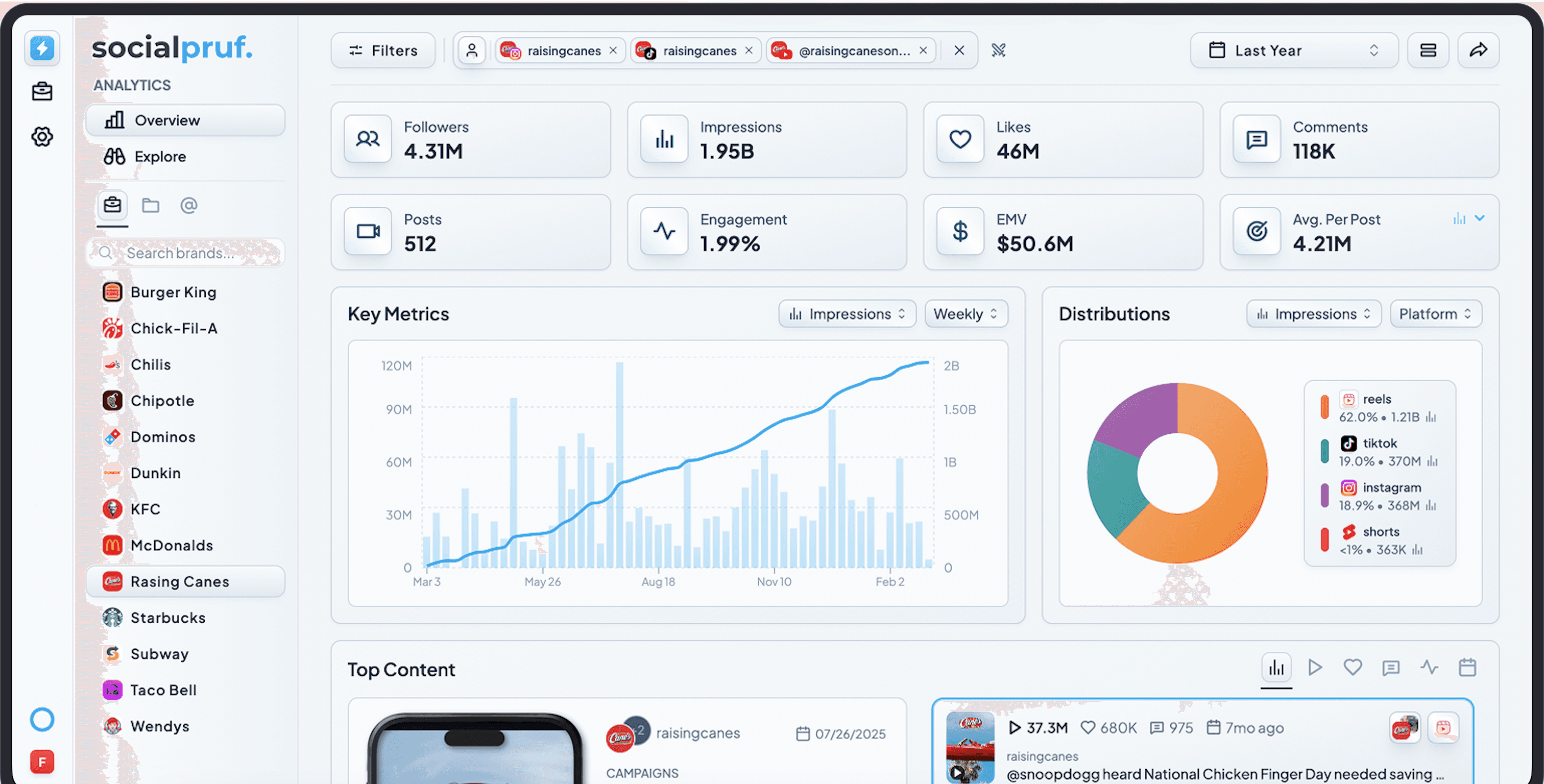
For some creators you can skip the collection entirely. Our account pages are free and need no login, @leomessi on Instagram is a representative one, and they already list each public post with its view count, likes, comments and the time it was last refreshed.
Route 2: Instagram and TikTok's own creator tools
The first-party creator tools are the best versions of what they do, and if a creator is inside one, use it.
Meta Creator Marketing Hub gives you real Instagram numbers straight from Meta, with no estimate or sampling in between. Per Instagram's help center, creators who join are told brands "can also see the content you've posted, access insights like your average reach and number of followers, and message you directly." Average reach on a creator you haven't hired is valuable, and no amount of public data reproduces it.
TikTok Creator Marketplace is the same idea done well. Creator-level average views, engagement rate and audience demographics, with campaign tooling that works, on the platform with the best organic distribution in the business.
The problem with this isn't quality, it's coverage. Both are opt-in and both are single-platform. You get excellent data on the creators already inside, nothing on everyone else, and you need both products open to look at one shortlist that spans both platforms.
Route 3: MCP servers
Connect an MCP server to an AI assistant and ask in plain words: the median view count on a creator's last twenty posts, or how their sponsored posts compare against their organic ones. The assistant fetches what it needs and does the math, with no spreadsheet to maintain and no glue code to write. That suits vetting, because vetting is a run of one-off questions rather than a dashboard you check every morning, and you rarely know what to ask next until you've seen the last answer.
The thing to get right is what sits behind the pipe. MCP is a connection standard, not a dataset. If the tool behind the server needs authorization, so does the server, and you're back to asking creators to connect something before you can ask anything about them. What you want behind it is a provider that will track any public handle you name, whether or not that creator has ever heard of you.
That's the part we built for. The Socialpruf MCP connector is included with a subscription and reads the same public post-level history the platform holds for any handle you add, across Instagram, TikTok, YouTube, X, Facebook, LinkedIn and Snapchat. Ask it for a creator's median views, their sponsored-versus-organic split or their trajectory over the last six months and it answers from stored history rather than whatever it can fetch today. We compared what the credible options actually return in our ranking of social media MCP servers, and the pattern held across all eight: the protocol is never the differentiator, the data behind it is.
Route 4: A dedicated platform
Which leaves the obvious answer, buy a tool built for this, and one catch that sends a lot of teams back to the start.
Most of them are authorization-based. The major analytics suites are built around accounts you connect, because that's the model that unlocks private metrics on accounts you own. Point one at a creator you have no relationship with and the picture thins out quickly. Creator and competitor coverage is narrower than owned-account coverage, several networks aren't supported for it at all, and history usually begins the day you add the account rather than the day the creator started posting. We went through twelve of them against their own documentation in tools that track accounts without authentication.
So the specification is narrower than "an analytics platform." You want what Route 1 proves is possible, done for you. Public posts, no connection, no invitation, every platform in one place, and history that starts before you'd heard of the creator.
That's what we built Socialpruf to be. Any public handle is an ordinary tracked account with full post-level history, carrying the same fields whether it's a creator you're evaluating, a creator you've hired, a competitor or your own brand, across Instagram, TikTok, YouTube, X, Facebook, LinkedIn and Snapchat. The sheet from Route 1 is the product, already filled in. We scrape and store the public posts ourselves rather than reading an authenticated feed, so there's no backfill window and a creator's history is there regardless of when you first looked them up. Sponsored posts separate from organic with a filter instead of an afternoon.
It's why Athelo Group runs reporting across 30+ athletes with zero account connections. Asking every creator on a roster to authorize a tool is a bottleneck long before it's a data problem. You can see what the output looks like on our analytics product page.
What you actually give up
Three things stay behind the creator's login. It's worth being precise about what they'd change, because the list is shorter than it feels.
The follower/non-follower split. It matters most for awareness campaigns where incremental audience is the point, and it's the best argument for requiring authorization after signing.
Watch time and retention. The metric that explains why two videos with identical view counts performed differently. Valuable for improving the next post. It doesn't help you choose between two creators you haven't hired.
Story performance. Instagram Stories are private to the owner and, per the platform's API behavior, insights go to the account owner only and inside a short window.
Frequently asked questions
Can you vet an influencer without them connecting their account?
Yes, for most of the questions that decide a partnership. The last 20 to 30 public posts give you their real audience size (median views rather than followers), their trajectory (recent median views against the previous ten), their cadence, and how their labeled sponsored posts perform against their organic ones. Verified audience demographics, reach, watch time and Story performance need authorization, and the first three of those only sharpen a campaign you've already run.
Where do I find a creator's view counts if I can't log in as them?
On the public profile. TikTok prints a view count on every thumbnail in the profile grid. Instagram shows play counts on Reels tab thumbnails and on feed video, though not on carousels or photos. The exception is Instagram's "View counts on profile" setting, which lets a professional account hide grid view counts from everyone but themselves. Use likes as the distribution proxy for that creator rather than recording a zero.
Why do vendors' audience demographics differ for the same creator?
Because they're estimates. Platforms without the creator's authorization infer age, gender and location from a sample of the follower list, and the sample size, method and refresh cadence differ by vendor and are rarely published. Two tools sampling different followers at different times will disagree and neither is lying. Treat demographic splits as directional unless they came from an authorized connection.
Should I ask for Insights screenshots at all?
Ask, but treat them as a claim to check rather than evidence. Compare the screenshotted numbers against the public metrics on the same posts. Likes and comments should match, and if a creator's claimed reach implies an engagement rate far outside what their public posts show, ask about it. The more valuable use of screenshots is contractual, for Stories, where no public record exists.