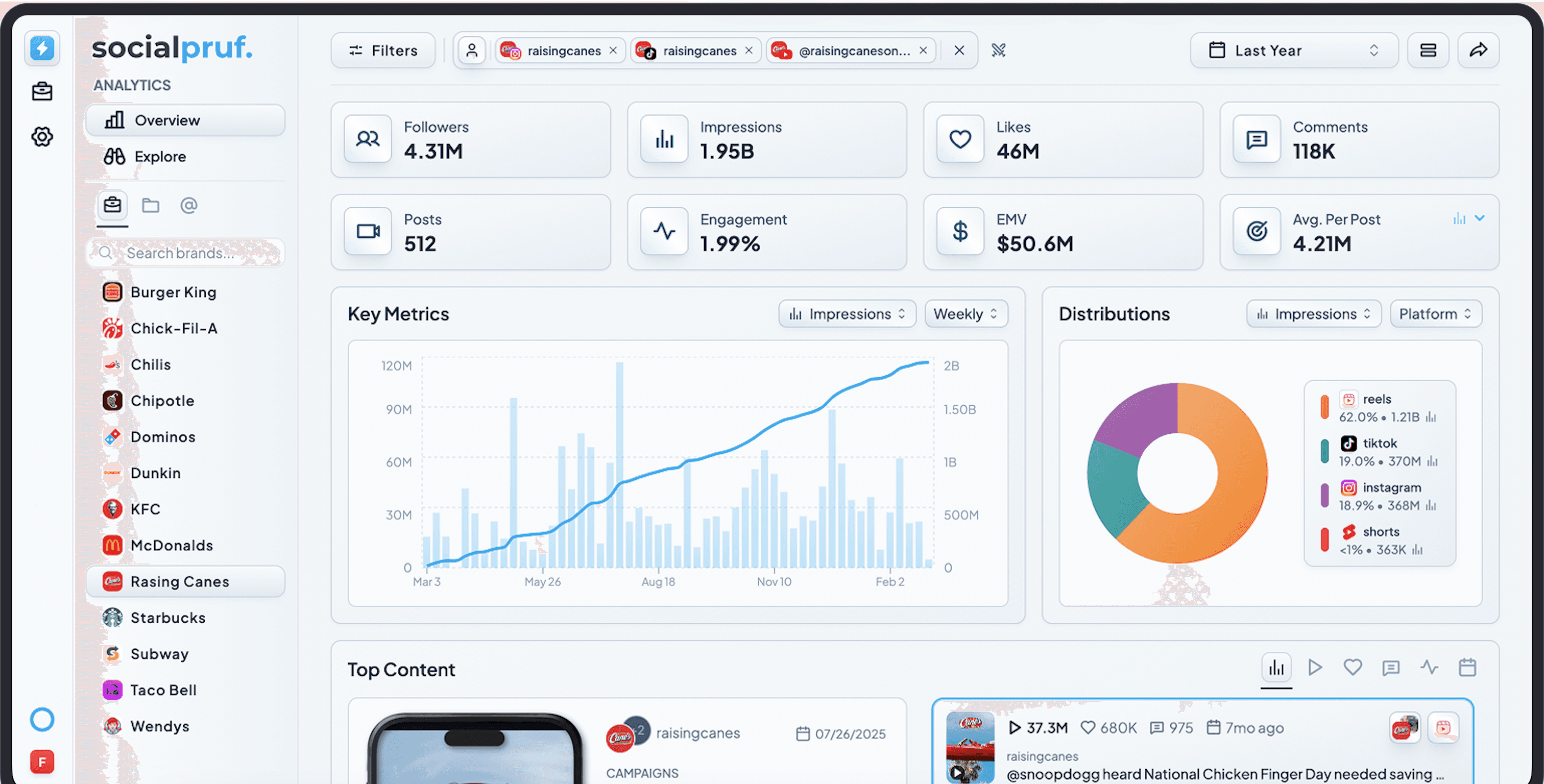
Socialpruf lets agencies, brands, media companies and talent teams track multiple public social media accounts without collecting passwords or connecting every profile. Add the handles you need, organize them into brands, campaigns and competitor sets, and measure them from one consistent source.
Socialpruf is a social media analytics platform for tracking multiple public accounts without logging into each one. Add the handles of brands, clients, creators, partners or competitors and Socialpruf collects their public content across Instagram, TikTok, YouTube, X, Facebook, LinkedIn and Snapchat. The account owner does not need to share a password, approve a request or maintain an OAuth connection.
This matters once the number of accounts you measure becomes larger than the number you own. A brand may operate eight profiles but report on another 40 creators and partners. An agency may manage ten clients and benchmark each against five competitors. A talent team may need current performance across an entire roster before any athlete has opened an authorization email.
At that scale, the problem is not finding another dashboard. It is building a reliable measurement system without turning account access into a second job.
What tracking without logging in actually means
"Without logging in" refers to the accounts being measured, not unrestricted access to the Socialpruf workspace. Your team signs into Socialpruf to manage its data, but the public social accounts you add do not need to be connected to it.
That means:
- You do not collect or store the account owner's password.
- The owner does not have to authorize Socialpruf through Instagram, TikTok or another network.
- A competitor does not have to grant permission before you measure it.
- A creator or partner does not have to complete an onboarding step.
- Reporting does not stop because a tracked account's access token expires.
- The account must be public. Private data remains private.
This is different from a traditional social media management platform. Publishing, inbox management and private analytics require an authenticated relationship with an account. Measuring the public performance of accounts you do not control requires a different model.
Count every account you measure, not just the ones you own
Most teams underestimate the size of their social measurement problem because they count only their own profiles.
Imagine a consumer brand with one account on five networks. Its owned footprint appears to be five accounts. Add eight recurring creators, ten retail partners and six direct competitors across the same networks and the real measurement set is much larger. Most of those accounts will never belong to the brand, yet their posts still affect campaign performance, distribution and the competitive benchmark.
The same pattern appears in different organizations:
| Team | Accounts it may need to measure |
|---|---|
| Agency | Client profiles, client sub-brands, creators and each client's competitors |
| Talent management | Every athlete or creator, their platform profiles and brand-partnership posts |
| Media company | Main properties, vertical brands, presenters, partners and rival publishers |
| Sports organization | League, team, athlete, sponsor, broadcaster and competitor accounts |
| Consumer brand | Owned channels, regional pages, retailers, creators, ambassadors and competitors |
The useful number is not "How many social accounts do we own?" It is "How many accounts can change the conclusion in our next report?"
Why connecting accounts one by one stops scaling
An authenticated connection is valuable when you own the profile. It unlocks private reach, audience demographics, watch time, link clicks and publishing permissions. The problem begins when that connection becomes the entry requirement for every account in the analysis.
Each additional account can introduce another owner, approval chain and failure point. Someone has to identify the administrator, send instructions, obtain the correct permissions and repeat the process when access changes. Creators have to trust another application. Clients may not control all of their legacy profiles. Competitors cannot be connected at all.
Even after setup, connections can break when passwords change, employees leave, tokens expire or a platform changes its permissions. The result is usually not a dramatic error. It is a quiet gap in a report that somebody notices after the reporting period has ended.
This creates four operational costs:
- Onboarding delay. Analysis cannot begin until every relevant owner completes their part.
- Incomplete coverage. The accounts that never connect disappear from the comparison.
- Uneven measurement. Owned accounts receive detailed analytics while partners and competitors receive a thinner set of public metrics.
- Ongoing maintenance. A measurement system becomes a list of connections that somebody has to keep alive.
When the job involves dozens or hundreds of accounts, reducing those dependencies matters more than adding another chart.
How to track multiple social media accounts in Socialpruf
Socialpruf treats any public profile as an account that can be measured. Your own brand, a client, a creator and a competitor enter the system in the same way and carry the same public post-level fields.
1. Build the complete account list
Start with the decision the reporting needs to support. If the goal is a competitive benchmark, list every meaningful competitor rather than the three that fit inside the old process. If the goal is partnership reporting, include the creators and brand accounts that publish campaign content. If the goal is portfolio management, include every property that leadership expects to see.
For each account, record the public handle and platform. No password or account-owner invitation is required.
2. Add the public handles
Add the accounts to Socialpruf. The platform collects their public profiles and post history instead of waiting for every owner to create a connection.
The difference is most obvious during onboarding. A talent team can add a newly signed creator itself. An agency can prepare a prospective-client benchmark before receiving administrator access. A brand can add a new competitor the day it enters the market.
3. Organize accounts around the business
A flat list of 100 profiles is not an analytics system. Group accounts into the structure used by the team:
- Brands and sub-brands
- Clients and portfolios
- Creator or athlete rosters
- Competitor sets
- Campaigns and partnerships
- Markets, leagues or content properties
The same account can matter in more than one context. A creator can belong to a roster, appear in a campaign and sit inside a partner report without their data being collected three different ways.
4. Use one measurement standard
Comparisons become unreliable when owned accounts, creators and competitors are measured with different definitions. Keep the date range, post types, platform filters and formulas consistent across the set.
Socialpruf lets teams compare account and post performance using the same public-data model. That makes it possible to answer questions such as:
- Which property generated the most views per post?
- Which creator performed above their normal median during the campaign?
- Did our brand outperform the competitor set during the launch window?
- Which partners drove meaningful distribution rather than simply publishing the most posts?
- Which account is growing fastest relative to its existing audience?
The aim is not to force every network into an identical metric. It is to make the source and calculation consistent enough that the comparison can be defended.
5. Turn the account structure into recurring reports
Once the accounts are organized, the reporting can follow the same structure. Build a live report for a client, roster, campaign or competitive landscape instead of rebuilding a slide deck from individual exports every month.
Socialpruf reports use shareable URLs, so stakeholders can view the finished report without joining the workspace. The underlying public statistics continue to update, which removes another login requirement from the reporting chain: the people reading the result do not need to become analytics-platform users.
What this looks like at 30, 150 and 200 accounts
The value of no-login tracking is easiest to see in organizations already operating at scale.
| Organization | Scale in Socialpruf | What the system replaces |
|---|---|---|
| Athelo Group | 30+ athletes, zero account connections | Chasing talent logins, rebuilding reports and preparing manual brand pitches |
| On3 | 150+ competitor accounts and more than one million posts | Manually monitoring a large college-sports media landscape |
| Vice Media | 200+ competitors and 2.8 million historical posts | Separate, delayed benchmarks across multiple media properties |
| Underdog Fantasy | 200+ accounts and 1,000+ posts catalogued each week | Separate systems for owned analytics, partners and competitors |
Athelo Group is the clearest version of the access problem. The agency manages reporting across more than 30 athletes with zero social account connections. A creator can be added without being asked for credentials, and the same live performance views can be used for client reporting and brand pitches.
Vice Media shows the other end of the problem. Its competitor sets cover more than 200 live accounts across five platforms. Those accounts are separated by media property, so each team gets a relevant benchmark instead of one blended industry average. Socialpruf has indexed 2.8 million historical posts across that system.
On3 uses more than one million posts from over 150 competitor accounts as a social intelligence layer for the college-sports industry. Underdog Fantasy brings owned properties, creators, partners, organic conversation and competitors into the same reporting environment, with more than 1,000 posts entering the system each week.
None of those systems would be complete if every account had to approve its own inclusion.
What you can measure without an account connection
The public layer is enough for many benchmarking, discovery and reporting jobs. Depending on the network and post format, it can include:
- Published posts and posting frequency
- Public follower counts
- Views or plays displayed on public content
- Likes and comments
- Public shares, reposts or saves where the network exposes them
- Content format and publishing time
- Captions, mentions and disclosed partnerships
- Account and post performance over a selected period
- Calculated measures such as median views, engagement rate and views per follower
Socialpruf stores the collected history and adds the organizational layer around it: account groups, campaigns, benchmarks, reports, goals, exports, API access and an MCP connector for AI analysis.
That is why the product is useful for more than competitor tracking. The same data model can cover accounts you own, accounts you work with and accounts you only observe.
What you cannot measure without logging in
No-login analytics does not turn private analytics into public data. Without an authenticated first-party connection, Socialpruf cannot retrieve metrics that the network shows only to the account owner, including:
- Private accounts and unpublished content
- True reach and unique viewers when they are not publicly displayed
- Watch time and audience-retention curves
- Audience age, gender and location
- Profile visits
- Link clicks and conversions
- Private Story analytics
- Paid advertising spend and campaign results
- Inbox messages and community-management data
Public data answers, "What did this account publish, and how did the visible content perform?" Authenticated analytics answers, "Who exactly saw our content, what did they do next and how did paid distribution contribute?"
Those are different questions. If publishing, community management, paid media or private audience analytics are central to the job, keep the connected platform that supplies them. Use Socialpruf for the wider ecosystem of accounts that the connected platform cannot cover consistently.
When Socialpruf fits alongside another social media tool
For many teams, this is not a replacement decision.
A social media management suite can remain the place where the team schedules posts, replies to messages and reads private analytics for owned profiles. Socialpruf becomes the measurement layer across the market around those profiles: competitors, creators, partners, clients and the rest of the brand portfolio.
The division is straightforward:
| Use a connected management tool for | Use Socialpruf for |
|---|---|
| Publishing and scheduling | Tracking public accounts at scale |
| Inbox and community management | Competitor and category benchmarking |
| Paid campaign analytics | Creator and partner measurement |
| Private reach and demographics | Historical public post analysis |
| Link clicks and conversions | Cross-account and cross-platform reports |
Trying to force one connection model to do both jobs is what creates the gap. The accounts a company owns are only one part of the environment it needs to understand.
A checklist for choosing a multi-account analytics platform
Before choosing a tool, map the real size and shape of the system:
- How many accounts do you own?
- How many additional accounts do you need to measure?
- Which accounts will never authorize your organization?
- Which networks must appear in the same report?
- Does history begin when you add an account, or before it?
- Are accounts measured at post level or only through averages?
- Can accounts be grouped around clients, brands, campaigns and competitors?
- What happens to the history if an account is removed or a connection expires?
- Can stakeholders see a report without buying another seat?
- Can the underlying posts be checked when somebody challenges a number?
The answers reveal whether the platform is designed for managing a handful of owned channels or understanding a much larger social ecosystem.
The final takeaway
Tracking multiple social media accounts should not require collecting multiple social media logins. Once the job expands beyond accounts your organization owns, an authorization-first workflow creates delays, missing accounts and permanent maintenance work.
Socialpruf is built for that larger set. Add the public handles, organize them around the business and measure owned accounts, clients, creators, partners and competitors from one consistent system. Use authenticated tools where private analytics and publishing are required; use Socialpruf where coverage, history and comparability matter.
If your next report depends on accounts you cannot log into, start with Socialpruf Analytics and build the complete account list rather than the convenient one.
Frequently asked questions
Can I track multiple social media accounts without their passwords?
Yes. Socialpruf can track public social media accounts without collecting the account owners' passwords or asking them to authorize a connection. Your team signs into Socialpruf, adds the public handles it needs and organizes those accounts into brands, campaigns, rosters or competitor sets.
Do account owners need to approve Socialpruf?
No approval is required to track the public content and statistics of a public account. Authorization is required only for private, owner-only data that a social network does not publish.
Which social networks can Socialpruf track?
Socialpruf tracks public accounts across Instagram, TikTok, YouTube, X, Facebook, LinkedIn and Snapchat. The exact metrics available vary because each network and content format exposes different public fields.
Can an agency track client accounts before receiving login access?
Yes. An agency can add a client's public handles and begin analyzing public post performance before receiving administrator access. A connection may still be needed later for publishing, paid media, inbox management and private first-party metrics.
Can Socialpruf track competitors and creators in the same dashboard?
Yes. Socialpruf uses the same public-data model for owned brands, clients, creators, partners and competitors. Accounts can be grouped and compared according to the team's reporting structure.
What social media metrics still require an authenticated login?
Private metrics such as audience demographics, watch time, retention, profile visits, link clicks, conversions and paid advertising results generally require access to the account owner's first-party analytics.
Is Socialpruf a social media management tool?
Socialpruf is an analytics, discovery and reporting platform rather than a publishing or inbox-management suite. Teams can use it alongside a management platform when they need both private analytics for owned accounts and consistent public analytics across accounts they do not control.