NewGet @archetypethemes's full report
X analytics
Similar Accounts:
followers
1.64K
impressions
100K
likes
1.02K
comments
258
posts
139
engagement
1.28%
emv
$2.58K
Average per post
719

Key Metrics

Distributions
Top Content

67% of mobile ecom sites still fail basic navigation UX.

Baymard’s 2025 benchmark reviewed 16,000+ homepage and category elements across 180+ leading US and European sites.

The result: most brands are still making product-finding harder than it needs to be.

Here’s where users get stuck most:

→ Mobile links that hide scope (“New Arrivals” instead of “Women’s New Arrivals”)
→ Menus with too many choices (10+ subcategories overwhelm users)
→ No “you are here” highlight in main navigation
→ Headers that aren’t clickable
→ Hover menus that flicker on desktop
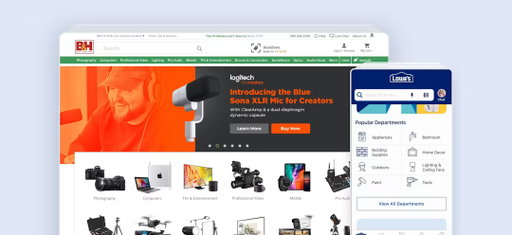
→ Overly dominant homepage ads
→ Carousels that rotate too fast
→ Text-only subcategory pages with no thumbnails
→ Lifestyle images that don’t link to products

Baymard’s data shows 58% of desktop and 67% of mobile sites still rate “mediocre” to “poor” on Homepage & Category Navigation UX.

That means even small improvements in structure and clarity can put your store ahead of most competitors.

If you only fix four things this quarter, make them these:

✅ Add scope to mobile links
✅ Highlight current category
✅ Slow down hover menus
✅ Move subcategories to the top of intermediary pages

It’s not about more design. It’s about less friction between discovery and decision.

Full research: https://t.co/VFYrW7l1NM
2.55K
14
4
1
1y ago
ArchetypeThemes
67% of mobile ecom sites still fail basic navigation UX. Baymard’s 2025 benchmark reviewed 16,000+ homepage and category elements across 180+ leading US and European sites. The result: most brands are still making product-finding harder than it needs to be. Here’s where users get stuck most: → Mobile links that hide scope (“New Arrivals” instead of “Women’s New Arrivals”) → Menus with too many choices (10+ subcategories overwhelm users) → No “you are here” highlight in main navigation → Headers that aren’t clickable → Hover menus that flicker on desktop → Overly dominant homepage ads → Carousels that rotate too fast → Text-only subcategory pages with no thumbnails → Lifestyle images that don’t link to products Baymard’s data shows 58% of desktop and 67% of mobile sites still rate “mediocre” to “poor” on Homepage & Category Navigation UX. That means even small improvements in structure and clarity can put your store ahead of most competitors. If you only fix four things this quarter, make them these: ✅ Add scope to mobile links ✅ Highlight current category ✅ Slow down hover menus ✅ Move subcategories to the top of intermediary pages It’s not about more design. It’s about less friction between discovery and decision. Full research: https://t.co/VFYrW7l1NM

For developers maintaining Shopify themes, structuring CSS is half the battle. CSS Cascade Layers make it easier to manage legacy styles, a principle we apply across Archetype themes too. Here’s a practical walkthrough inspired by Victor Ayomipo’s Smashing Magazine guide 👇 1️⃣ Define your layer order Start by declaring it at the top of your stylesheet: (@)layer reset, base, layout, components, utilities; Later layers take higher priority. Add an animation layer if you want to separate keyframes. 2️⃣ Group styles by responsibility → reset: browser defaults like box-sizing and margin resets → base: global elements: body, typography, scrollbars → layout: overall structure and positioning → components: reusable parts like buttons, menus, logos → utilities: single-purpose helpers such as .noselect This modular structure keeps overrides intentional and easy to debug. 3️⃣ Reduce specificity before layering Replace #ids with .classes and remove redundant !important declarations. This ensures the cascade behaves predictably. 4️⃣ Keep media queries with their components Responsive styles should sit beside their base rules. It maintains context and consistent priority. 5️⃣ Handle !important carefully Important declarations inside earlier layers can override later ones. Minimize or refactor them to avoid confusion. 6️⃣ Know how unlayered CSS behaves Anything written outside a declared @layer has the highest priority. Use it sparingly. 7️⃣ Browser support Cascade Layers are supported by roughly 94 % of browsers, ready for production use. Refactoring CSS with Cascade Layers won’t fix everything overnight, but it gives your theme a scalable structure: clearer hierarchy, fewer conflicts, and easier long-term maintenance. Read the full breakdown here: t.co/uU18zFccjg Follow @ArchetypeThemes for more front-end insights, modern CSS practices, and developer-focused theme updates.

2.51K
16
3
1
12mo ago
ArchetypeThemes
For developers maintaining Shopify themes, structuring CSS is half the battle. CSS Cascade Layers make it easier to manage legacy styles, a principle we apply across Archetype themes too. Here’s a practical walkthrough inspired by Victor Ayomipo’s Smashing Magazine guide 👇 1️⃣ Define your layer order Start by declaring it at the top of your stylesheet: (@)layer reset, base, layout, components, utilities; Later layers take higher priority. Add an animation layer if you want to separate keyframes. 2️⃣ Group styles by responsibility → reset: browser defaults like box-sizing and margin resets → base: global elements: body, typography, scrollbars → layout: overall structure and positioning → components: reusable parts like buttons, menus, logos → utilities: single-purpose helpers such as .noselect This modular structure keeps overrides intentional and easy to debug. 3️⃣ Reduce specificity before layering Replace #ids with .classes and remove redundant !important declarations. This ensures the cascade behaves predictably. 4️⃣ Keep media queries with their components Responsive styles should sit beside their base rules. It maintains context and consistent priority. 5️⃣ Handle !important carefully Important declarations inside earlier layers can override later ones. Minimize or refactor them to avoid confusion. 6️⃣ Know how unlayered CSS behaves Anything written outside a declared @layer has the highest priority. Use it sparingly. 7️⃣ Browser support Cascade Layers are supported by roughly 94 % of browsers, ready for production use. Refactoring CSS with Cascade Layers won’t fix everything overnight, but it gives your theme a scalable structure: clearer hierarchy, fewer conflicts, and easier long-term maintenance. Read the full breakdown here: https://t.co/uU18zFccjg Follow @ArchetypeThemes for more front-end insights, modern CSS practices, and developer-focused theme updates.
When your product catalog has too many categories, shoppers freeze.

Baymard’s research shows that once users see more than 10 to 15 options in a menu, they start to feel overwhelmed.

Too many choices make it harder to process what they see.

On desktop, they lose their bearings.
On mobile, scrolling adds friction and makes it harder to understand how products are organised.

When subcategories become too specific, like splitting “Hair,” “Skin,” and “Nails” into smaller buckets, users end up in half-empty sections that feel broken.

A few takeaways from Baymard’s testing:

✅ Group subcategories under clear main categories
✅ Keep each list to around 10–15 items
✅ Avoid creating categories with only a few products
✅ Ensure every step in the hierarchy feels logical and balanced

This creates navigation that feels natural and easy to explore.

If you are rethinking your theme setup or collection structure, this is one of the simplest ways to improve usability, especially on mobile.
2.23K
17
3
1
11mo ago
ArchetypeThemes
When your product catalog has too many categories, shoppers freeze. Baymard’s research shows that once users see more than 10 to 15 options in a menu, they start to feel overwhelmed. Too many choices make it harder to process what they see. On desktop, they lose their bearings. On mobile, scrolling adds friction and makes it harder to understand how products are organised. When subcategories become too specific, like splitting “Hair,” “Skin,” and “Nails” into smaller buckets, users end up in half-empty sections that feel broken. A few takeaways from Baymard’s testing: ✅ Group subcategories under clear main categories ✅ Keep each list to around 10–15 items ✅ Avoid creating categories with only a few products ✅ Ensure every step in the hierarchy feels logical and balanced This creates navigation that feels natural and easy to explore. If you are rethinking your theme setup or collection structure, this is one of the simplest ways to improve usability, especially on mobile.

UX knowledge pays off long after the course ends. For Shopify merchants and developers, understanding user experience helps you design stores that perform better and convert faster. Here are 6 trusted UX programs that teach the skills behind seamless ecommerce experiences: 1️⃣ Baymard Institute UX Certification Based on 78,000+ hours of ecommerce research. Learn real guidelines used by top stores. 2️⃣ Google UX Design Certificate A solid foundation in user flow, research, and prototyping. 3️⃣ Interaction Design Foundation Focused courses on usability, navigation, and user research. 4️⃣ General Assembly UX Design Structured lessons with mentorship and hands-on projects. 5️⃣ CareerFoundry UX Program Full bootcamp experience with personal coaching and feedback. 6️⃣ Smashing Conference Workshops Live sessions led by experts covering modern UX challenges. Why it matters A better grasp of UX helps you: ✅ Simplify navigation and reduce friction ✅ Improve product discovery and flow ✅ Align store structure with real buyer behavior Small UX improvements can create big changes in how shoppers move through your store. Full list and course details: 👇 t.co/iHuU5UKRM1 Explore Shopify themes built with UX best practices: t.co/9ASQU4iGOs Follow @ArchetypeThemes for more insights on designing stores that feel effortless to shop.
2.13K
18
5
1
11mo ago
ArchetypeThemes
UX knowledge pays off long after the course ends. For Shopify merchants and developers, understanding user experience helps you design stores that perform better and convert faster. Here are 6 trusted UX programs that teach the skills behind seamless ecommerce experiences: 1️⃣ Baymard Institute UX Certification Based on 78,000+ hours of ecommerce research. Learn real guidelines used by top stores. 2️⃣ Google UX Design Certificate A solid foundation in user flow, research, and prototyping. 3️⃣ Interaction Design Foundation Focused courses on usability, navigation, and user research. 4️⃣ General Assembly UX Design Structured lessons with mentorship and hands-on projects. 5️⃣ CareerFoundry UX Program Full bootcamp experience with personal coaching and feedback. 6️⃣ Smashing Conference Workshops Live sessions led by experts covering modern UX challenges. Why it matters A better grasp of UX helps you: ✅ Simplify navigation and reduce friction ✅ Improve product discovery and flow ✅ Align store structure with real buyer behavior Small UX improvements can create big changes in how shoppers move through your store. Full list and course details: 👇 https://t.co/iHuU5UKRM1 Explore Shopify themes built with UX best practices: https://t.co/9ASQU4iGOs Follow @ArchetypeThemes for more insights on designing stores that feel effortless to shop.

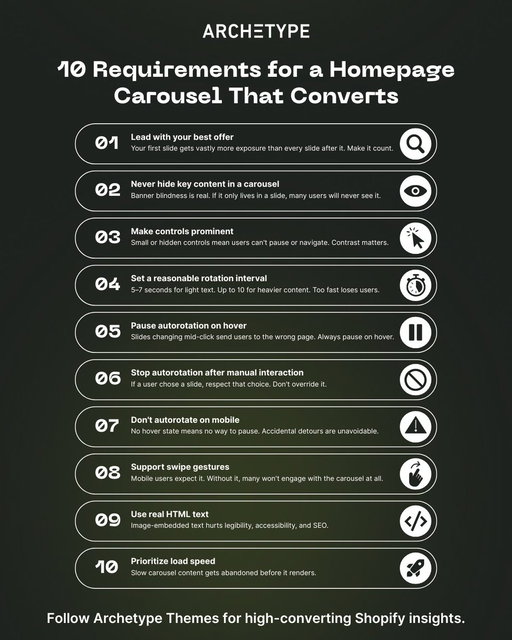
How much conversion are you losing to a homepage carousel that isn't working?

46% of ecommerce sites with carousels have usability issues, and most merchants don't know it.

These 10 requirements determine whether your carousel helps or hurts:

1/ Choose your first slide carefully
Most users never see the rest

2/ Never make carousel slides the only route to key content
Many users skip them entirely due to banner blindness

3/ Make controls prominent
Small or hidden controls mean users can't pause or navigate

4/ Set a reasonable autorotation interval
5–7 seconds for light text, up to 10 for heavier content

5/ Pause autorotation on hover
Slides changing mid-click send users to the wrong page

6/ Stop autorotation after manual interaction
If a user chose a slide, respect that choice

7/ Don't autorotate on mobile
No hover state means no way to pause, accidental detours are unavoidable

8/ Support swipe gestures
Mobile users expect it and will disengage without it

9/ Use real HTML text, not image-embedded text
Legibility and SEO both suffer otherwise

10/ Prioritize load speed
Slow carousel content gets abandoned before it renders

Why this matters for merchants:

Carousels aren't a homepage strategy. They're a feature that requires getting 10 things right simultaneously, on both desktop and mobile.

Sites that can't nail all 10 perform just as well with static homepage sections. Users scroll naturally, every offer gets equal visibility, and there's nothing to break.

Source: https://t.co/5sRUscX1Nl

Follow @ArchetypeThemes for more ecommerce UX insights.
2.03K
14
3
2
7mo ago
ArchetypeThemes
How much conversion are you losing to a homepage carousel that isn't working? 46% of ecommerce sites with carousels have usability issues, and most merchants don't know it. These 10 requirements determine whether your carousel helps or hurts: 1/ Choose your first slide carefully Most users never see the rest 2/ Never make carousel slides the only route to key content Many users skip them entirely due to banner blindness 3/ Make controls prominent Small or hidden controls mean users can't pause or navigate 4/ Set a reasonable autorotation interval 5–7 seconds for light text, up to 10 for heavier content 5/ Pause autorotation on hover Slides changing mid-click send users to the wrong page 6/ Stop autorotation after manual interaction If a user chose a slide, respect that choice 7/ Don't autorotate on mobile No hover state means no way to pause, accidental detours are unavoidable 8/ Support swipe gestures Mobile users expect it and will disengage without it 9/ Use real HTML text, not image-embedded text Legibility and SEO both suffer otherwise 10/ Prioritize load speed Slow carousel content gets abandoned before it renders Why this matters for merchants: Carousels aren't a homepage strategy. They're a feature that requires getting 10 things right simultaneously, on both desktop and mobile. Sites that can't nail all 10 perform just as well with static homepage sections. Users scroll naturally, every offer gets equal visibility, and there's nothing to break. Source: https://t.co/5sRUscX1Nl Follow @ArchetypeThemes for more ecommerce UX insights.
Collection page architecture should be a UX decision backed by research, not just a design choice.

Baymard Institute's latest findings:

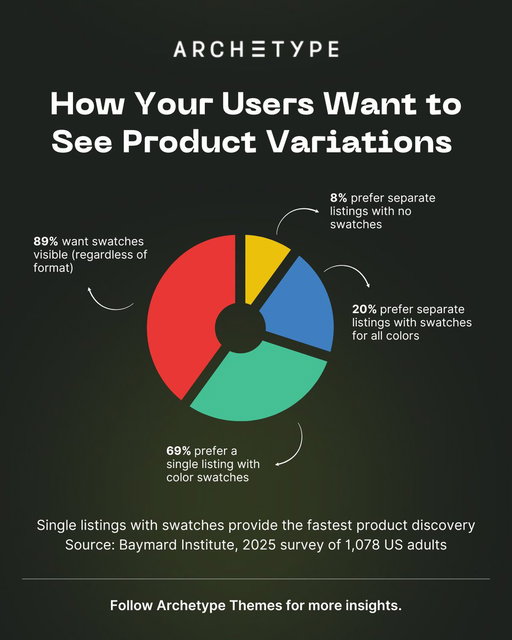
69% prefer single listings with swatches
89% expect swatches regardless of format
Younger audiences may diverge (worth testing)

The reasoning: single listings provide faster cognitive processing.
Users scan options without extra clicks, spot their preferred variation immediately, and move to product pages with intent.

Separate listings for every variant creates decision fatigue.

Users encounter the same product multiple times, have to mentally group variations, and lose context on what they've already considered.

For theme architecture, this means your collection page templates should default to single listings with swatch support.

Not as an add-on, but as a fundamental structure.
Swatches need to be performant. No layout shift, fast loading.

The option to toggle between formats should exist for edge cases, but single listings should be the optimized path.

UX research like this shapes how we think about theme defaults.

Conversion happens when structure aligns with user expectations.

Source: https://t.co/aVppJ6ws8E
1.84K
13
3
1
11mo ago
ArchetypeThemes
Collection page architecture should be a UX decision backed by research, not just a design choice. Baymard Institute's latest findings: 69% prefer single listings with swatches 89% expect swatches regardless of format Younger audiences may diverge (worth testing) The reasoning: single listings provide faster cognitive processing. Users scan options without extra clicks, spot their preferred variation immediately, and move to product pages with intent. Separate listings for every variant creates decision fatigue. Users encounter the same product multiple times, have to mentally group variations, and lose context on what they've already considered. For theme architecture, this means your collection page templates should default to single listings with swatch support. Not as an add-on, but as a fundamental structure. Swatches need to be performant. No layout shift, fast loading. The option to toggle between formats should exist for edge cases, but single listings should be the optimized path. UX research like this shapes how we think about theme defaults. Conversion happens when structure aligns with user expectations. Source: https://t.co/aVppJ6ws8E
When your catalog has more roses than your garden has space.

Heirloom Roses runs over 1001 rose varieties, each with unique color, height, and fragrance, and still makes shopping feel effortless.

Here’s how they do it with Gem 👇
1.74K
12
4
1
11mo ago
ArchetypeThemes
When your catalog has more roses than your garden has space. Heirloom Roses runs over 1001 rose varieties, each with unique color, height, and fragrance, and still makes shopping feel effortless. Here’s how they do it with Gem 👇
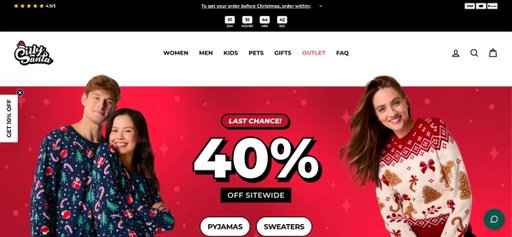
Silly Santa uses Impulse to turn seasonal shoppers into confident buyers.

But too often, stores in this space fall short:

– Image galleries that don't show enough product angles
– CTAs buried below the fold or hard to spot
– Product information dumped in walls of text
– Mobile layouts that feel cramped and cluttered

Here's what Silly Santa does better with Impulse:

✅ Image gallery that shows the full product

8 thumbnail images below main shot: front view, back view, detail shots, fabric close-ups. Users understand the product visually before reading anything.

✅ CTAs that demand attention

Bright yellow "ADD TO CART" button above the fold with high contrast.
Red "Buy it now" button offers express checkout with payment icons visible (Apple Pay, Google Pay, PayPal, Shop Pay).

✅ Information organized for scanning

Expandable accordions for QUICK POSTS, A FEW REASONS TO BUY FROM US, and DELIVERY & CLICK & COLLECT.

Details available without overwhelming the page.

✅ Spacing that breathes on mobile

Clean white space between product image, price, size selector, and CTAs.
Reviews section clearly separated.
Cross-sells positioned below without crowding purchase decisions.

Trust signals integrated throughout:

5-star rating near title, sale price €23.97 (was €29.99) with -20% badge, trust badges at bottom (free shipping above €70, 100,000+ happy customers, 100-day return policy).

You don't need complicated PDPs to convert seasonal shoppers.
You just need clarity at every decision point.

See Silly Santa in action: https://t.co/FocVS8eADq

Explore Impulse: https://t.co/QTlHDfciMt

👉 Follow @ArchetypeThemes for more UX pattern breakdowns and merchant insights.
1.72K
13
3
1
10mo ago
ArchetypeThemes
Silly Santa uses Impulse to turn seasonal shoppers into confident buyers. But too often, stores in this space fall short: – Image galleries that don't show enough product angles – CTAs buried below the fold or hard to spot – Product information dumped in walls of text – Mobile layouts that feel cramped and cluttered Here's what Silly Santa does better with Impulse: ✅ Image gallery that shows the full product 8 thumbnail images below main shot: front view, back view, detail shots, fabric close-ups. Users understand the product visually before reading anything. ✅ CTAs that demand attention Bright yellow "ADD TO CART" button above the fold with high contrast. Red "Buy it now" button offers express checkout with payment icons visible (Apple Pay, Google Pay, PayPal, Shop Pay). ✅ Information organized for scanning Expandable accordions for QUICK POSTS, A FEW REASONS TO BUY FROM US, and DELIVERY & CLICK & COLLECT. Details available without overwhelming the page. ✅ Spacing that breathes on mobile Clean white space between product image, price, size selector, and CTAs. Reviews section clearly separated. Cross-sells positioned below without crowding purchase decisions. Trust signals integrated throughout: 5-star rating near title, sale price €23.97 (was €29.99) with -20% badge, trust badges at bottom (free shipping above €70, 100,000+ happy customers, 100-day return policy). You don't need complicated PDPs to convert seasonal shoppers. You just need clarity at every decision point. See Silly Santa in action: https://t.co/FocVS8eADq Explore Impulse: https://t.co/QTlHDfciMt 👉 Follow @ArchetypeThemes for more UX pattern breakdowns and merchant insights.
Most grooming brands sell products.

Pupwell sells confidence.

Here’s how they used the Fetch theme to turn grooming education into a seamless shopping experience 👇
1.70K
12
5
1
11mo ago
ArchetypeThemes
Most grooming brands sell products. Pupwell sells confidence. Here’s how they used the Fetch theme to turn grooming education into a seamless shopping experience 👇

Shopify just rolled out VAT number validation at checkout for EU and UK merchants! 🙌 Big update for merchants selling B2B across Europe. If you use Shopify Tax in the EU or UK, you can now enable automatic VAT number validation at checkout, applying the reverse charge exemption on eligible orders without manual work. What this means: ✅ VAT numbers entered at checkout are automatically validated ✅ Reverse charge exemption applied automatically on eligible orders ✅ VAT numbers saved to customer profiles for future orders ✅ Correct VAT invoice documentation generated when exemption applies The exemption applies to EU → EU shipments (where destination differs from fulfillment country) and EU → UK shipments. It does not apply to UK → EU or UK → UK shipments. To enable it: go to checkout settings and set the Company VAT number field to Optional. A few things to keep in mind, reverse charge eligibility is based on your fulfillment location country, not your store address. If you have multiple fulfillment locations, changing which location fulfills an order affects eligibility. And while VAT validation confirms formatting and validity, Shopify recommends verifying independently via the EU's VIES service if you suspect fraudulent use. Shopify is rolling this out over the next few weeks. Read the full documentation: t.co/BYgmndpVzW Follow @ArchetypeThemes for Shopify platform updates.

1.64K
18
3
3
8mo ago
ArchetypeThemes
Shopify just rolled out VAT number validation at checkout for EU and UK merchants! 🙌 Big update for merchants selling B2B across Europe. If you use Shopify Tax in the EU or UK, you can now enable automatic VAT number validation at checkout, applying the reverse charge exemption on eligible orders without manual work. What this means: ✅ VAT numbers entered at checkout are automatically validated ✅ Reverse charge exemption applied automatically on eligible orders ✅ VAT numbers saved to customer profiles for future orders ✅ Correct VAT invoice documentation generated when exemption applies The exemption applies to EU → EU shipments (where destination differs from fulfillment country) and EU → UK shipments. It does not apply to UK → EU or UK → UK shipments. To enable it: go to checkout settings and set the Company VAT number field to Optional. A few things to keep in mind, reverse charge eligibility is based on your fulfillment location country, not your store address. If you have multiple fulfillment locations, changing which location fulfills an order affects eligibility. And while VAT validation confirms formatting and validity, Shopify recommends verifying independently via the EU's VIES service if you suspect fraudulent use. Shopify is rolling this out over the next few weeks. Read the full documentation: https://t.co/BYgmndpVzW Follow @ArchetypeThemes for Shopify platform updates.

In cart design, most themes optimize for checkout: 👉 treating carts as transaction tools, while users rely on them as holding zones for products they're considering. The result? Sessions expire too quickly. Product details disappear. Cross-device persistence fails. And users resort to screenshots, bookmarks, or emailing themselves links. What to do instead: 1/ Build cart persistence across sessions and devices 48% of users save products by adding them to cart. Support that behavior, not just checkout. 2/ Display full product details on cart pages Users reference carts like shopping lists. Images, variant info, and pricing need to stay visible. 3/ Make wishlist features more discoverable 21% prefer dedicated save tools when they can find them. Poor visibility drives users back to cart workarounds. 4/ Extend session timeouts strategically If carts clear before users are ready to decide, you force them to start over or work around your interface. For theme developers, the takeaway is simple: Better cart UX comes from supporting actual user behavior, not ideal checkout flows. Cart functionality determines user experience. Follow @ArchetypeThemes for more ecommerce UX insights.

1.62K
14
3
1
11mo ago
ArchetypeThemes
In cart design, most themes optimize for checkout: 👉 treating carts as transaction tools, while users rely on them as holding zones for products they're considering. The result? Sessions expire too quickly. Product details disappear. Cross-device persistence fails. And users resort to screenshots, bookmarks, or emailing themselves links. What to do instead: 1/ Build cart persistence across sessions and devices 48% of users save products by adding them to cart. Support that behavior, not just checkout. 2/ Display full product details on cart pages Users reference carts like shopping lists. Images, variant info, and pricing need to stay visible. 3/ Make wishlist features more discoverable 21% prefer dedicated save tools when they can find them. Poor visibility drives users back to cart workarounds. 4/ Extend session timeouts strategically If carts clear before users are ready to decide, you force them to start over or work around your interface. For theme developers, the takeaway is simple: Better cart UX comes from supporting actual user behavior, not ideal checkout flows. Cart functionality determines user experience. Follow @ArchetypeThemes for more ecommerce UX insights.

70% of ecommerce visitors abandon their shopping cart. After 14 years of checkout research, Baymard reveals what breaks the purchase flow. 👉 Why does that matter? Sites invest heavily in marketing, product discovery, and homepage design. Then 70% of users abandon after adding items to cart. The checkout determines whether interested buyers complete purchase or leave. 👉 The research behind it: Baymard benchmarked 325 top US and EU ecommerce sites across 110+ Cart & Checkout guidelines. This created a database with 30,000+ manually reviewed checkout elements and 26,000+ best and worst practice examples. 👉 Current performance: • 65% of sites have mediocre or worse checkout UX. • Only 35% feature decent or better checkout flows. • Just 2% are rated good. • None reach perfect performance. 👉 The opportunity: The average site has 32 unique improvements to make in their checkout flow. Better checkout UX can potentially improve conversion rates by 35% for the average large-scale ecommerce site. 👉 Why users abandon: During 14 years of testing, checkout design and flow frequently caused abandonments. Users either became frustrated and left, or didn't know how to complete fields and had no option but to abandon. 👉 The lesson: After users add items to cart, 32 fixable issues stand between current performance and 35% better conversion. Poor checkout UX turns interested buyers into abandoned carts. Read the full research here: t.co/kg5UZ1X8cD Follow @ArchetypeThemes for more ecommerce UX research.

1.60K
14
4
1
10mo ago
ArchetypeThemes
70% of ecommerce visitors abandon their shopping cart. After 14 years of checkout research, Baymard reveals what breaks the purchase flow. 👉 Why does that matter? Sites invest heavily in marketing, product discovery, and homepage design. Then 70% of users abandon after adding items to cart. The checkout determines whether interested buyers complete purchase or leave. 👉 The research behind it: Baymard benchmarked 325 top US and EU ecommerce sites across 110+ Cart & Checkout guidelines. This created a database with 30,000+ manually reviewed checkout elements and 26,000+ best and worst practice examples. 👉 Current performance: • 65% of sites have mediocre or worse checkout UX. • Only 35% feature decent or better checkout flows. • Just 2% are rated good. • None reach perfect performance. 👉 The opportunity: The average site has 32 unique improvements to make in their checkout flow. Better checkout UX can potentially improve conversion rates by 35% for the average large-scale ecommerce site. 👉 Why users abandon: During 14 years of testing, checkout design and flow frequently caused abandonments. Users either became frustrated and left, or didn't know how to complete fields and had no option but to abandon. 👉 The lesson: After users add items to cart, 32 fixable issues stand between current performance and 35% better conversion. Poor checkout UX turns interested buyers into abandoned carts. Read the full research here: https://t.co/kg5UZ1X8cD Follow @ArchetypeThemes for more ecommerce UX research.

Shopify CLI 3.91 just made dev testing a lot cleaner! 💻

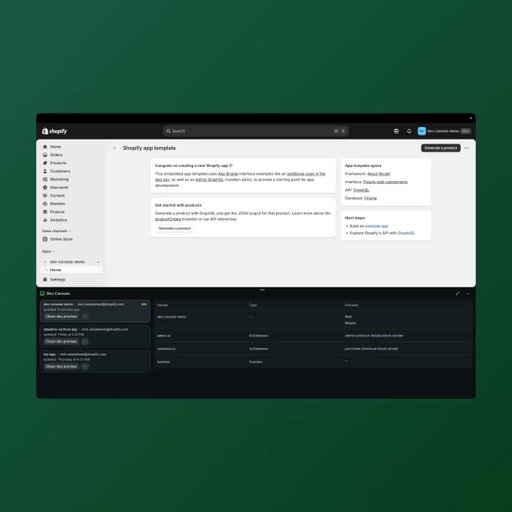
The Dev Console now shows all active dev previews and their extensions directly in the admin, no more switching between tools to track what's running.

What's new:

✅ See all active dev previews and extensions in one place
✅ View who created each preview and when it was last updated
✅ Access preview links for your app and extensions
✅ Open QR codes for mobile testing directly from the console
✅ Clean up unused dev previews without leaving admin
✅ Jump to your app on the Dev Dashboard in one click

Already using Shopify CLI? Run shopify app dev and open the admin to access the Dev Console now.

Faster testing. Cleaner workflows. Everything visible from one place.

Read the full app testing documentation:
https://t.co/L8F8v4j3Xg

Follow @ArchetypeThemes for Shopify development updates.
1.56K
12
3
1
7mo ago
ArchetypeThemes
Shopify CLI 3.91 just made dev testing a lot cleaner! 💻 The Dev Console now shows all active dev previews and their extensions directly in the admin, no more switching between tools to track what's running. What's new: ✅ See all active dev previews and extensions in one place ✅ View who created each preview and when it was last updated ✅ Access preview links for your app and extensions ✅ Open QR codes for mobile testing directly from the console ✅ Clean up unused dev previews without leaving admin ✅ Jump to your app on the Dev Dashboard in one click Already using Shopify CLI? Run shopify app dev and open the admin to access the Dev Console now. Faster testing. Cleaner workflows. Everything visible from one place. Read the full app testing documentation: https://t.co/L8F8v4j3Xg Follow @ArchetypeThemes for Shopify development updates.
Most grooming brands sell products.

Pupwell sells confidence.

Here’s how they used the Fetch theme to turn grooming education into a seamless shopping experience 👇
1.49K
12
4
1
11mo ago
ArchetypeThemes
Most grooming brands sell products. Pupwell sells confidence. Here’s how they used the Fetch theme to turn grooming education into a seamless shopping experience 👇
Shopify update: changes to shoppable videos and posts.

They’ve officially removed shoppable videos and shoppable posts from product pages and Shop Stores (effective October 15, 2025).

Why? It’s part of a migration to a new web-based platform that’ll make buyer discovery faster and more dynamic.

Here’s what merchants need to know 👇

1/ Shoppable videos

Still discoverable in the Shop home feed, reaching more shoppers than before.
They’ll return to product pages soon with improved discovery features.

2/ Shoppable posts

This feature has been discontinued.
Shopify is shifting focus to Shop Minis, smaller standalone experiences designed to drive more sales.

3/ Your main store isn’t affected

All your existing channels and checkout flows remain the same.

For merchants, this update is another reminder: the storefront is where discovery begins.

Your theme plays a bigger role than ever, it’s the first touchpoint that converts curiosity into confidence.

Full details on the update: https://t.co/BTs4H12u57
1.47K
11
3
1
11mo ago
ArchetypeThemes
Shopify update: changes to shoppable videos and posts. They’ve officially removed shoppable videos and shoppable posts from product pages and Shop Stores (effective October 15, 2025). Why? It’s part of a migration to a new web-based platform that’ll make buyer discovery faster and more dynamic. Here’s what merchants need to know 👇 1/ Shoppable videos Still discoverable in the Shop home feed, reaching more shoppers than before. They’ll return to product pages soon with improved discovery features. 2/ Shoppable posts This feature has been discontinued. Shopify is shifting focus to Shop Minis, smaller standalone experiences designed to drive more sales. 3/ Your main store isn’t affected All your existing channels and checkout flows remain the same. For merchants, this update is another reminder: the storefront is where discovery begins. Your theme plays a bigger role than ever, it’s the first touchpoint that converts curiosity into confidence. Full details on the update: https://t.co/BTs4H12u57
Tall women spend years hunting for inseams that actually fit.

Tall Size built a marketplace to fix that, and Expanse keeps the entire 1,600+ SKU catalog easy to shop.

Here’s how ↓
1.45K
13
4
2
11mo ago
ArchetypeThemes
Tall women spend years hunting for inseams that actually fit. Tall Size built a marketplace to fix that, and Expanse keeps the entire 1,600+ SKU catalog easy to shop. Here’s how ↓
Content and commerce are blurring together, and theme architecture determines if it works or breaks.

Merchants want editorial imagery on collection pages, video throughout the journey, and shoppable blog experiences.

That's why your theme has to support content-heavy commerce without sacrificing performance.

Here's what theme architecture needs to handle:

1️⃣ Performance with rich media
Large images and videos only convert if they load fast. Lazy loading, responsive sizing, and minimal JavaScript blocking keep experiences smooth on all devices.

2️⃣ Schema flexibility for content
Merchants need editorial layout controls without dev tickets. Video embeds, product cards in content, and flexible image placement should be built into the theme schema.

3️⃣ Blog templates that support commerce
Basic blogs work for articles. Content-commerce needs product embeds, optimized galleries, and related product sections built into templates.

4️⃣ Mobile-first content architecture
Mobile needs a different optimization than desktop. Video performance, touch-optimized galleries, and faster load times require specific architecture.

Here's why it matters:

When theme architecture handles content and commerce together, merchants build editorial experiences without compromising performance or hiring developers.

Good themes support both flexibility and speed from the start.

👉 Follow @ArchetypeThemes for more ecommerce UX insights.
1.41K
12
3
1
11mo ago
ArchetypeThemes
Content and commerce are blurring together, and theme architecture determines if it works or breaks. Merchants want editorial imagery on collection pages, video throughout the journey, and shoppable blog experiences. That's why your theme has to support content-heavy commerce without sacrificing performance. Here's what theme architecture needs to handle: 1️⃣ Performance with rich media Large images and videos only convert if they load fast. Lazy loading, responsive sizing, and minimal JavaScript blocking keep experiences smooth on all devices. 2️⃣ Schema flexibility for content Merchants need editorial layout controls without dev tickets. Video embeds, product cards in content, and flexible image placement should be built into the theme schema. 3️⃣ Blog templates that support commerce Basic blogs work for articles. Content-commerce needs product embeds, optimized galleries, and related product sections built into templates. 4️⃣ Mobile-first content architecture Mobile needs a different optimization than desktop. Video performance, touch-optimized galleries, and faster load times require specific architecture. Here's why it matters: When theme architecture handles content and commerce together, merchants build editorial experiences without compromising performance or hiring developers. Good themes support both flexibility and speed from the start. 👉 Follow @ArchetypeThemes for more ecommerce UX insights.
Most pet brands struggle to make ecommerce feel human.

Supakit found the balance, using the Streamline theme to blend craftsmanship, clarity, and connection. 👇
1.37K
12
4
1
11mo ago
ArchetypeThemes
Most pet brands struggle to make ecommerce feel human. Supakit found the balance, using the Streamline theme to blend craftsmanship, clarity, and connection. 👇
Baymard tested mobile filtering across 80+ product lists and found a critical usability issue.

Users apply multiple filters then scroll through results. When they return to check their selections, there's no visible reminder of active filters. They must reopen the filtering interface just to confirm what they filtered by.

Real examples of this friction:

➡️ Walmart and Williams-Sonoma hide applied filters. Users reopen the interface repeatedly just to see their selections.

➡️ Nike shows six active filters in the filtering interface but provides no indication on the product list itself. Users who forget what they filtered assume no suitable products exist.

➡️ Amazon closes the interface after deselecting one filter. Removing multiple filters requires reopening it over and over.

The fix Baymard validated:

Display applied filters above the mobile product list. Users see active filters and understand result scope without leaving the page.

Two approaches work: horizontal scrolling (truncate rightmost filter, show total count, include scroll bar) or stacked rows (everything visible, no scrolling needed).

Crutchfield and Home Depot both implement this correctly. Users never lose track of what they filtered by.

Follow @ArchetypeThemes for UX insights that improve conversion.
1.34K
14
2
1
8mo ago
ArchetypeThemes
Baymard tested mobile filtering across 80+ product lists and found a critical usability issue. Users apply multiple filters then scroll through results. When they return to check their selections, there's no visible reminder of active filters. They must reopen the filtering interface just to confirm what they filtered by. Real examples of this friction: ➡️ Walmart and Williams-Sonoma hide applied filters. Users reopen the interface repeatedly just to see their selections. ➡️ Nike shows six active filters in the filtering interface but provides no indication on the product list itself. Users who forget what they filtered assume no suitable products exist. ➡️ Amazon closes the interface after deselecting one filter. Removing multiple filters requires reopening it over and over. The fix Baymard validated: Display applied filters above the mobile product list. Users see active filters and understand result scope without leaving the page. Two approaches work: horizontal scrolling (truncate rightmost filter, show total count, include scroll bar) or stacked rows (everything visible, no scrolling needed). Crutchfield and Home Depot both implement this correctly. Users never lose track of what they filtered by. Follow @ArchetypeThemes for UX insights that improve conversion.
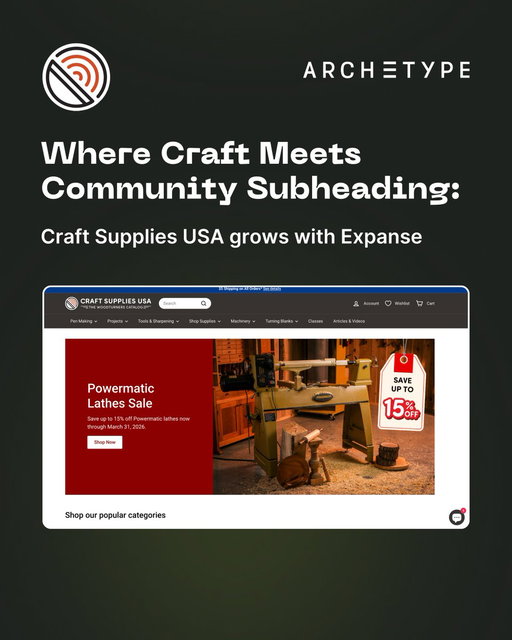
How do specialty retailers turn a decades-old catalog into a modern shopping experience?

Craft Supplies USA shows us how with their Shopify store powered by the Expanse theme.

Their implementation proves what's possible when a 279+ product catalog meets the right theme foundation:

→ Subcollection tiles that guide beginner and expert woodturners to the right products instantly
→ Layered homepage promotions spotlighting sales, closeouts, and shipping offers
→ Volume pricing tables and variant selectors built for technical purchasing decisions
→ A 4.9-star review section that lets the community do the converting
→ Classes and blog integration that keeps customers coming back to learn, not just buy

For niche specialty retailers balancing depth with discovery, Expanse delivers the structure, merchandising tools, and content flexibility needed to grow.

Swipe through to see how Craft Supplies USA built a community hub 👇

See Craft Supplies USA in action: https://t.co/gxjs32hC0l

Try Expanse for your brand: https://t.co/39wyhvmZ3E

What feature would make the biggest impact on your store?
1.25K
13
3
1
8mo ago
ArchetypeThemes
How do specialty retailers turn a decades-old catalog into a modern shopping experience? Craft Supplies USA shows us how with their Shopify store powered by the Expanse theme. Their implementation proves what's possible when a 279+ product catalog meets the right theme foundation: → Subcollection tiles that guide beginner and expert woodturners to the right products instantly → Layered homepage promotions spotlighting sales, closeouts, and shipping offers → Volume pricing tables and variant selectors built for technical purchasing decisions → A 4.9-star review section that lets the community do the converting → Classes and blog integration that keeps customers coming back to learn, not just buy For niche specialty retailers balancing depth with discovery, Expanse delivers the structure, merchandising tools, and content flexibility needed to grow. Swipe through to see how Craft Supplies USA built a community hub 👇 See Craft Supplies USA in action: https://t.co/gxjs32hC0l Try Expanse for your brand: https://t.co/39wyhvmZ3E What feature would make the biggest impact on your store?

ARCHΞTYPE (@archetypethemes) X Stats & Analytics

ARCHΞTYPE (@archetypethemes) has 1.64K X followers with a 1.28% engagement rate over the past 12 months. Across 139 posts, ARCHΞTYPE received 1.02K total likes and 100K impressions, averaging 7.32 likes per post. This page tracks ARCHΞTYPE's performance metrics, top content, and engagement trends — updated daily. To benchmark @archetypethemes against other accounts, use Socialpruf's X competitor analysis tool.

ARCHΞTYPE (@archetypethemes) X Analytics FAQ

How many X (Twitter) followers does ARCHΞTYPE have?+
ARCHΞTYPE (@archetypethemes) has 1.64K X (Twitter) followers as of October 2026.
What is ARCHΞTYPE's X (Twitter) engagement rate?+
ARCHΞTYPE's X (Twitter) engagement rate is 1.28% over the last 12 months, based on 139 posts.
How many likes does ARCHΞTYPE get on X (Twitter)?+
ARCHΞTYPE received 1.02K total likes across 139 posts in the last 12 months, averaging 7.32 likes per post.
How many X (Twitter) impressions does ARCHΞTYPE get?+
ARCHΞTYPE's X (Twitter) content generated 100K total impressions over the last 12 months.
Can I compare ARCHΞTYPE with other X accounts?+
Yes. Add @archetypethemes to a competitor set with Socialpruf's X competitor analysis tool and benchmark it side by side with any other public accounts on views, engagement rate and follower growth, with history back to each account's first post.